
Planda updates - Dec. 11
New feature: Grade on final to final grade plot
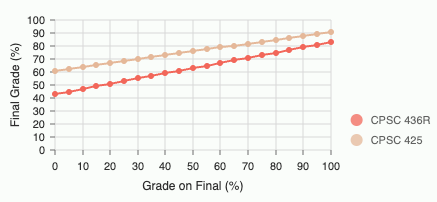
Plot will show when grades for each group except finals have been added to a category.
Instructions
Click on the group.

Click on the edit icon, and fill in ‘Grading Weight’ and ‘Current Grade’.
As long as every group (excluding finals) with ‘Grading Weight’ filled in also has ‘Current Grade’, the course will show up on the home page. The course also must have the final exam as a group (this group is required to have the word ‘final’ somewhere inside the name, case does not matter), and fill in ‘Grading Weight’ for the final exam.
Other
- Allow disable confetti + task completion animations
- Always show animation for high priority + tasks with over 2 subtasks
- Bug fix: Certain tasks were showing up in the future section, instead of ‘current tasks’, due to not excluding completed tasks in isFuture calculations for tasks with groups.
- Subtasks can now be hidden and reopened with a caret icon on the task bullet point. Quick add option for subtasks only shows up for tasks that already have subtasks.